logo
    • Buy Crypto
    • Markets
    • Futures
    • Spot
    • Earn
    • Affiliates & AI
    • More
    Popular topics
    Latest articles
    Featured articles
    Announcements
    Latest updates
    Futures events
    Spot events
    Rewards
    TradFi
    Listings/Delistings
    Spot listings
    Futures listings
    Spot delistings/maintenance
    Futures delistings/maintenance
    Earn delistings/maintenance
    About WEEX
    Community channels
    Account security
    About the platform
    Compliance
    Terms of Use and Policies
    Careers
    FAQ
    Deposit/Withdrawal
    Account access and verification
    Explore WEEX
    Common trading issues
    Futures essentials
    Compensation
    Copy trading
    How-to guides
    FAQ
    Elite traders
    Copiers
    WEEX app
    Downloading the app
    Quick Buy/OTC
    Quick Buy
    ChipPay
    OSL Pay
    P2P
    P2P announcements
    Getting started
    Merchant guide
    P2P appeals
    P2P Trading Tips and rules
    WEEX API
    API announcements
    API trading pairs
    Tutorials
    Futures trading
    Futures guide
    Auto Earn
    Spot trading
    Glossary
    Affiliate program
    Earn
    Staking
    Hackathon
    Hackathon updates
    1. Help Center
    2. Announcements
    3. Latest updates
    4. How to Get Your WEEX Tax Repor...
    Popular topics
    Latest articles
    Featured articles
    Announcements
    Latest updatesFutures eventsSpot eventsRewardsTradFi
    Listings/Delistings
    Spot listingsFutures listingsSpot delistings/maintenanceFutures delistings/maintenanceEarn delistings/maintenance
    About WEEX
    Community channelsAccount securityAbout the platformComplianceTerms of Use and PoliciesCareers
    FAQ
    Deposit/WithdrawalAccount access and verificationExplore WEEXCommon trading issuesFutures essentialsCompensation
    Copy trading
    How-to guidesFAQElite tradersCopiers
    WEEX app
    Downloading the app
    Quick Buy/OTC
    Quick BuyChipPayOSL Pay
    P2P
    P2P announcementsGetting startedMerchant guideP2P appealsP2P Trading Tips and rules
    WEEX API
    API announcementsAPI trading pairs
    Tutorials
    Futures tradingFutures guideAuto EarnSpot tradingGlossaryAffiliate program
    Earn
    Staking
    Hackathon
    Hackathon updates

    How to Get Your WEEX Tax Report via KoinX

    By: WEEX
    |
    0
    Dear WEEXers,
     
    Tax reporting allows you to keep track of your crypto activity in order to ensure you are fulfilling the reporting requirements laid out by your regulatory bodies. With WEEX, you are now able to have your transactions tracked and accounted for automatically by using the WEEX API on KoinX.
    If you need to file taxes and generate statements of your transaction records, you can use our Tax Tool API to automatically sync your data with KoinX, a third-party tax tool vendor.
     
    Disclaimer: WEEX does not provide tax advice. The regulatory framework for taxation of cryptocurrencies differs from country to country; hence we strongly advise you to contact your personal tax advisor for further information about your personal tax circumstances.
     
    • Please note that third-party tax software (KoinX) will charge a service fee.
    • Users who registered before August 1, 2025, are temporarily unable to use the third-party tax filing feature.

    How It Works

    Step 1: Create Your Tax API

    • Website: WEEX API Management (Note: API management functionality is only available on the Web version.)
    1. Log in to WEEX, go to the API page, and click "Create new API".
    1.png
    1. Complete the required fields and security verification.
    2.png
     
    1. Important: Under Permission settings, select only "Account details".
    2. Record Credentials: During this process, you must record and securely save your Passphrase, Access API Key, and Secret Key.
    Note: The Secret Key will only be shown once.
    3需做模糊.png

    Step 2: Request API Activation

    For security reasons, you must apply to enable the permissions for your newly created API.
    • Form Link: Application Questionnaire
    1. Complete the questionnaire. Note: All information provided must strictly match your WEEX account and the API details created in Step 1.
    2. After submission, please wait for the activation email reply.Users who registered before August 1, 2025, are temporarily unable to use the third-party tax filing feature.

    Step 3: Import Data & Generate Report

    Once your API is activated, use KoinX to process your tax data.
    • Website: KoinX Overview
    1. Add WEEX: Log in to KoinX, click "Add Transactions", and search for "WEEX" to select the exchange.
    6.png
    7.png
     
    1. Sync Data: Enter your Passphrase, Access API Key, and Secret Key. Click "Import Now".
    1. The data import process may take a few minutes depending on your transaction volume.
    8.png
    9.png
     
    1. Verify Portfolio: Once synced, you can review your account data under Portfolio → Dashboard.
       
    10.png


    Tax Settings: You can navigate to "Tax Settings" in the left sidebar to customize your tax details, including country, base currency, and fiscal year/time period.
     
    17.PNG


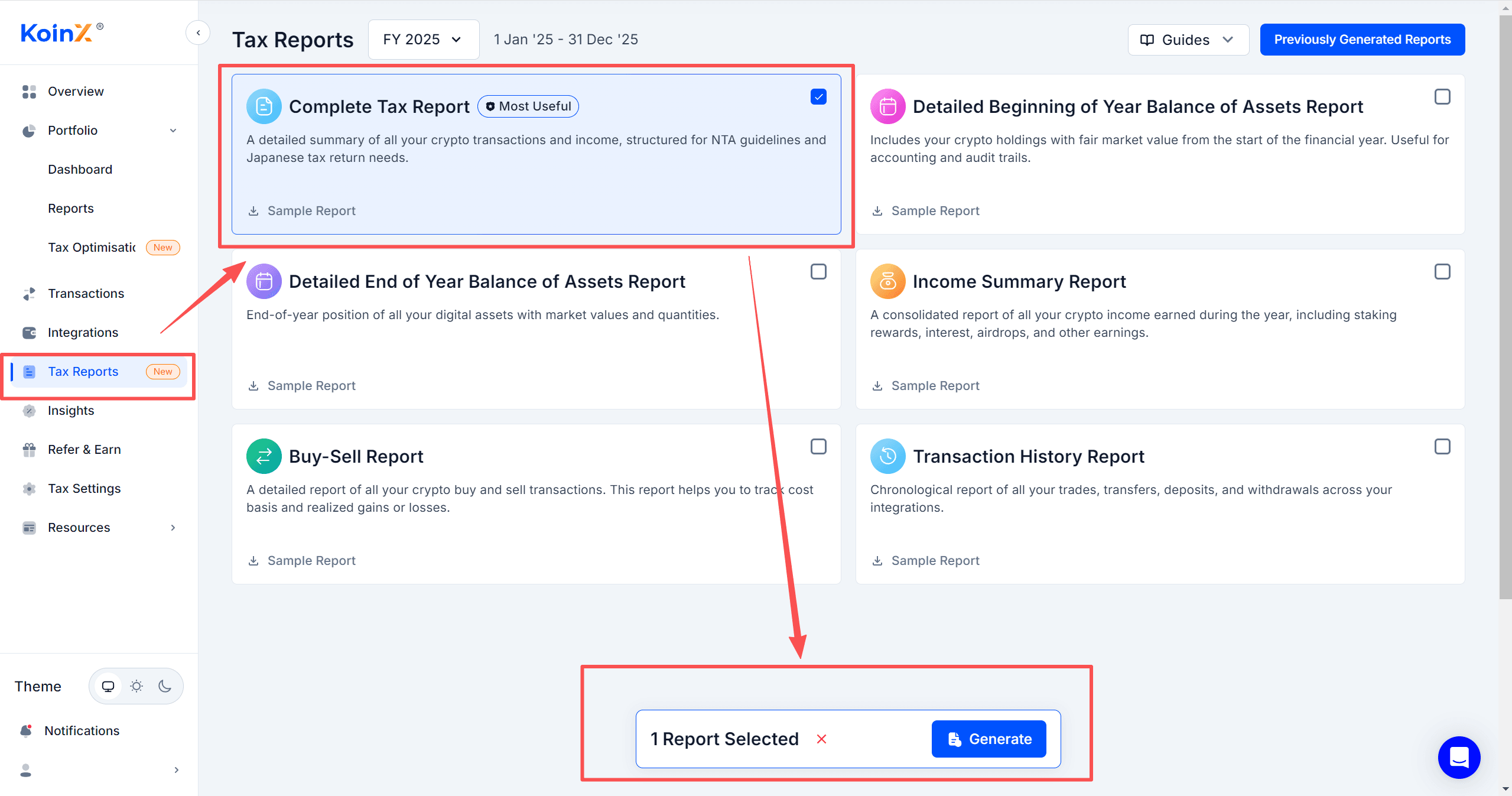
    1. Generate Report: Navigate to "Tax Reports" on the left sidebar, choose your required report type, and click "Generate" at the bottom.
       
      12.png


    2. Apply Discount: On the payment page, remember to use the WEEX exclusive discount.
       
    13.png
    14.png
    18.PNG
     

    Step 4: Receive Your Report

    1. After successful payment, KoinX will automatically generate your report.
    2. Check Your Inbox: The final tax report will be sent directly to the email address linked to your KoinX account.
    15.png
    16.png
     

    Frequently Asked Questions (FAQ)

    1. Are there any fees for using third-party providers to file taxes via API? 
    Depending on the third-party tax tool software you use, the KoinX platform currently integrated with WEEX will charge a service fee for generating specialized reports.
     
    2. Do I need to pay taxes when buying or selling Bitcoin? 
    This depends on the tax regulations of your specific country or region. Generally, trading digital assets may trigger capital gains or losses that are subject to taxation. We recommend consulting with a local tax professional for precise guidance.

     
    Related articles
    WEEX to adjust leverage for ZIL USDT-M perpetual futures—Jul 29, 2026WEEX to adjust leverage for COTI USDT-M perpetual futures—Jul 28, 2026WEEX increases daily free guaranteed price usesWEEX Futures Adjusts Leverage for Multiple Trading Pairs – 2026/07/16WEEX is about to Launch Crazylive Staking!
    Share
    copy

    Gainers

    logoCommunity
    iconiconiconiconiconiconicon
    Customer Support:@weikecs
    Business Cooperation:@weikecs
    Quant Trading & MM:bd@weex.com
    VIP Program:support@weex.com
    • About Us
    • Announcement Center
    • Media Kit
    • WEEX Community
    • WXT Zone
    • Announcement
    • Legal Statement
    • Risk Disclosure
    • Terms and Policies
    • Privacy Policy
    • Whistleblower Notice
    • AML/CTF Policy
    • Law Enforcement
    • User Guide
    • Product Launches
    • Crypto News
    • Product Launches
    • Crypto Wiki
    • Learn
    • Q&A
    • Spot
    • Futures
    • Glossary
    • VIP Program
    • Download
    • Affiliate
    • Protection Fund
    • Proof of Reserves
    • Sitemap
    • ETFs
    • Crypto Prices
    • Price Predictions
    • WXT Price
    • BTC Price
    • ETH Price
    • DOGE Price
    • How to Buy Crypto
    • How to Buy WXT
    • How to Buy BTC
    • How to Buy ETH
    • How to Buy DOGE
    • Help Center
    • Fee Schedule
    • Trading Rules
    • WEEX Academy
    • Contact Verifier
    • Submit Feedback
    • About Us
    • Announcement Center
    • Media Kit
    • WEEX Community
    • WXT Zone
    • Announcement
    • Help Center
    • Fee Schedule
    • Trading Rules
    • WEEX Academy
    • Contact Verifier
    • Submit Feedback
    • Customer Support Bot
    • VIP Services
    • Legal Statement
    • Risk Disclosure
    • Terms and Policies
    • Privacy Policy
    • Whistleblower Notice
    • AML/CTF Policy
    • Law Enforcement
    • Proof of Reserves
    • Invite Friends
    • OTC
    • Download
    • Affiliate
    • VIP Program
    • API
    • Broker
    • Listing Application
    • Affiliate T&C
    • Sitemap
    • Futures
    • Spot
    • Copy Trade
    • Markets
    • WEEX Store
    • User Guide
    • Product Launches
    • Crypto News
    • Product Launches
    • Crypto Wiki
    • Learn
    • Q&A
    • Spot
    • Futures
    • Glossary
    • VIP Program
    • Download
    • Affiliate
    • Protection Fund
    • Proof of Reserves
    • Sitemap
    • ETFs
    • Crypto Prices
    • Price Predictions
    • WXT Price
    • BTC Price
    • ETH Price
    • DOGE Price
    • How to Buy Crypto
    • How to Buy WXT
    • How to Buy BTC
    • How to Buy ETH
    • How to Buy DOGE
    • About Us
    • Announcement Center
    • Media Kit
    • WEEX Community
    • WXT Zone
    • Announcement
    • Help Center
    • Fee Schedule
    • Trading Rules
    • WEEX Academy
    • Contact Verifier
    • Submit Feedback
    • Legal Statement
    • Risk Disclosure
    • Terms and Policies
    • Privacy Policy
    • Whistleblower Notice
    • AML/CTF Policy
    • Law Enforcement
    • Customer Support Bot
    • VIP Services
    • Futures
    • Spot
    • Copy Trade
    • Markets
    • WEEX Store
    • Proof of Reserves
    • Invite Friends
    • OTC
    • Download
    • Affiliate
    • VIP Program
    • API
    • Broker
    • Listing Application
    • Affiliate T&C
    • Sitemap
    • User Guide
    • Product Launches
    • Crypto News
    • Product Launches
    • Crypto Wiki
    • Learn
    • Q&A
    • Spot
    • Futures
    • Glossary
    • VIP Program
    • Download
    • Affiliate
    • Protection Fund
    • Proof of Reserves
    • Sitemap
    • ETFs
    • Crypto Prices
    • Price Predictions
    • WXT Price
    • BTC Price
    • ETH Price
    • DOGE Price
    • How to Buy Crypto
    • How to Buy WXT
    • How to Buy BTC
    • How to Buy ETH
    • How to Buy DOGE

    Where new wealth is made

    Download app

    Sign Up
    h5 logo
    Download